How to Softmod Wii |
||
White Softmod Wii 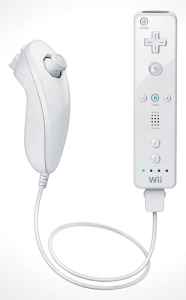 |
Begginers Way to Learn How to Softmod Wii How to Softmod Wii version 4.3e or 4.3u takes moderate technical ability. You will require a SD card (formatted in FAT32). but not an SDHC card and one of the following games LEGO Indiana Jones (The Original Adventures). Here are the steps How to Softmod Wii. Download your initial softmod files 4.3-HackMii-Installer.zip. (Use search engine for file link)Next you will ensure that you SD card is formatted to FAT32 copy the downloaded files onto your SD card. Play the first level of Indiana Jones and save the game. Click on SD card and copy Indiana PWNs save game for your region to your Wii console. Note do not have the nun chuck attached when playing Indiana Jones, Load save game slot 1 when the game comes up you will be in Barnett College, walk to the Art Room via the Courtyard, go toward the left character that is on the podium, as soon as it zooms in on him pick the switch to option. The Hackmii installer should then load. Select Hackmii installer and press A on your controls, read the Hack Mii message regarding it being free and press 1. That is the first step how to softmod Wii complete. Install the Homebrew Channel and install BootMIi (boot 2 if you can and not IOS). Go out of Hackmii Installer, the homebrew channel should be loading now. Select HOME on your menu and launch BootMii. Next you make a NAND backup. BootMii does not enable your wiimote. Press Power, Power, Power, reset, reset. BootMii controls are Reset=Select, Power=Right and Eject=Left. Download a second set of softmod files 4.3-Mod_Pack.zip (use search engine for link). Copy the files to your SD card keeping the file structure. In the Homebrew Channel Press HOME and Load Boot Mii. After this Multi-Mod manager should start via cboot2. Now select "WAD Manager" and Press A. Press "1" to Install all Wads and then Press A, 19 wads should install without any problems. Now press any button to continue. |
|
